A few days ago a distant family member shared some old photos of my great grandmother (or great great) and a few details about her that I thought would be interesting to preserve. So, that got me thinking. What’s the best way to preserve this data for the future generations? I’m aware there is software for family trees – both free and commercial, closed and open source. But for some reason they didn’t feel right. So I tried to think why not – what could be better.
Picture this: one of your descendants, 200 years from now, finds a copy of the tree in your basement. It would be like treasure for them. It needs to work! In the worst-case scenario, the information at least should be human-readable separately if the app doesn’t work (let’s ignore hardware issues for now…*). Below is my list of requirements that I came up with for family tree software:
🟣 1. It should be Local-First (no server needed) and self-contained inside a folder/directory.
🟣 2. It should minimize the amount of software that could stop working at some point… Browser-based? A browser can be seen as more permanent and it mostly renders based on a set of open standards. Additionally, users can just click on .HTML files to open them without needing a local/remote server (e.g. FastAPI)
🟣 3. The family tree should be copyable offline and off-the-grid to facilitate permanent storage and sharing (e.g. via SD Card*)
🟣 4. It should support rich media: audio 🎵, photo 📸, video 🎥, links 🔗 and informational texts 💬.
🟣 5. Using the family tree should not require a build/compile step
Before we go forward, I have to warn you this is experimental and the repo is mostly vibe coded. I would welcome ideas and suggestions for improvements.
To keep it minimalistic, I thought there should be 2 screens:
- The family tree: a visual representation of the family.
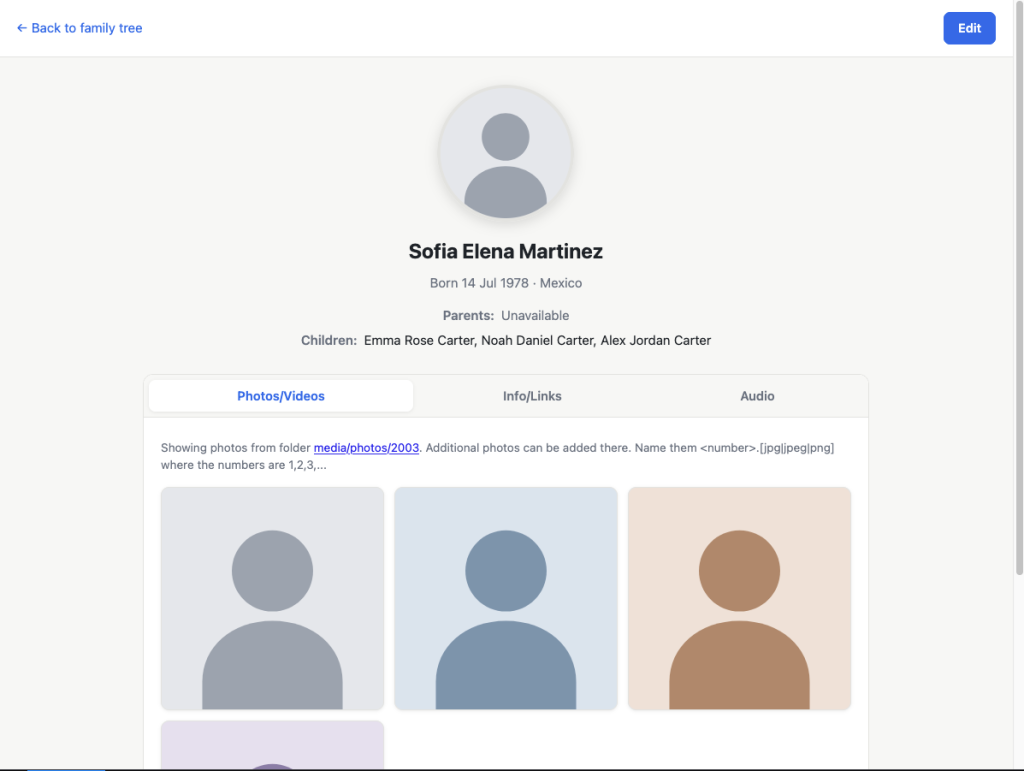
- A detail page for each person: extra information, including pictures and videos, audio and texts (e.g. ‘She liked scuba diving’)
This is what I came up with:
Main family tree view
Detail Page – showing one person
In the detail page, we can show photos, videos, audio, bits of information (e.g. owned a restaurant) and more.
Now let’s get a bit more technical.
Here’s the repo: https://github.com/purplehoisincoder/own-fam-tree
As you can see, everything is vanilla JS, HTML and CSS. A user can go into the folder and click the .HTML to get started.
The browser loads the files via the file:// protocol (instead of the usual https://). Being under file:// we have a few extra restrictions as you will see below.
Data vs Code
Ideally, we want to have a separate family.json (human-readable JSON format) outside of the code.
From a developer perspective, it’s usually convenient to separate the data from the code but it also facilitates manual
edits to the family tree with a text editor. Sadly you will see the data lives in a family.js file instead (not JSON)
because browsers seem to allow pulling in JS files via <script src> but there is no equivalent for JSON files in a file:// context.
Rendering the tree
The tree layout is also implemented here using JavaScript and SVG – no graph/layout library. The connecting lines are drawn as SVG elbow paths on zoom-enabled infinite canvas.
Using the browser as the base for this app means that we don’t need to install anything to visualize a tree and we benefit from all the rendering good stuff available to web apps. However, since we want to do a local-first app (See 🟣 #1 above), the browser environment comes with some restrictions.
Adding photos of a family member
It would be great if people can just drop photos of a family member into the person’s directory and they would magically appear in the tree. Sadly we didn’t achieve that since the browser blocked that dynamic exploration of directories. The displayed photos are the ones stored under media/photos/<person-id>/<photo-number>. (we probe for .jpg, .jpeg, .png and .webp). Apparently when the browser loads a page using file://, you cannot explore directories to discover photos and their file names. Probing for specific files is allowed, so numbering 1, 2, 3, … solved that issue.
One file or many files?
The tree of family members is defined in a `family.js` file, alongside the family tree definition. This all works really well in Desktop 🎉 and I was quite happy with it! However… phones 📱 are another story. I cannot just send the folder on and expect the other person to be able to one-click open it fine.
Perhaps if it was a single .HTML file that would be better for phones and sharing. That might be the way, but – in my (dev) eyes – it makes everything a bit worse since you have one massive file combining all the HTML, CSS and JS from both pages. However… it might be the only way? I tried adding a function that generates a single .HTML file ON-THE-GO, like an ‘export for sharing’ mechanism but it seems browsers don’t allow reading CSS and JS files when the page is rendered with the `file://` protocol. Anyway, I’m not an expert on this front 🤷♂️.
Modifications and sync
The ever-present problem, how do we keep it up to date? As we are dealing with a local-first app where people have their own copies of the data, how can we help every family member benefit from the updates made by a distant cousin living in another country? This is where we would need to add an optional server-based mechanism. To stay true to the project, it would need to be an open API spec that can be self-hosted.
Final thoughts
Taking all this into account, thinking about the software and the hardware, should we just use pen and paper instead? I would definitely print a few copies 📜.
I hope you enjoyed reading about this project and please please please let me know if you have ideas of how to make this better and feel free to send PRs. Also, if you are learning languages, check out Webbu; an effortless way to learn and get free stories every week in your target language.
* Potential hardware issues: SSDs don’t hold the information for long if unplugged